Skip to content
LIDERYA

LIDERYA Platform · Features

Every feature solves an execution problem.

It is not a collection of features. It is the control center of the ICEBERG Program: each piece exists because, without it, the project gets lost somewhere between the vision and the week.

How to read this page

The problem
What breaks in execution when that piece is missing.
The answer
How the platform solves it, in concrete terms.
What changes
What your team gains every week.

Eleven capabilities, one system

The problem first. The feature second.

Each block answers one question: what breaks in execution and how the platform prevents it.

01 · Execution Roadmap

From the vision to objectives and key results, without starting from a blank page.

The problem it solves
Turning a vision into measurable objectives is the hardest part, and the one that gets postponed the most. Many teams stay with general statements that nobody knows how to measure.
How it solves it
AI-guided support takes the team step by step: from the vision to strategic objectives, and from each objective to its key results. The AI proposes wording and measures; the team adjusts or discards them.
  • Guided questions, one decision at a time.
  • Proposals you can approve, adjust or discard.
  • Nothing is saved until you approve it.
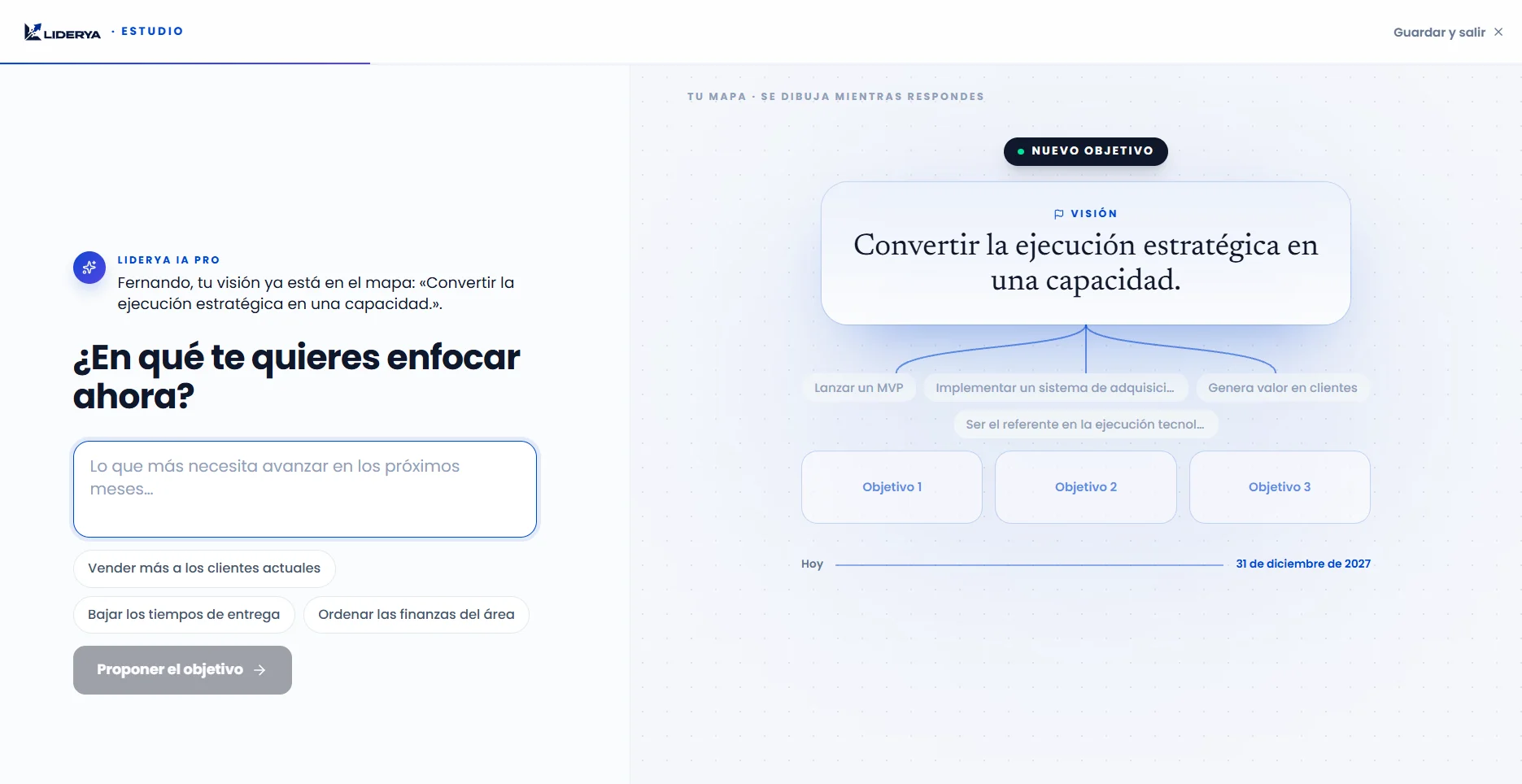
Execution Roadmap with a LIDERYA IA PRO proposal awaiting approval (interface in Spanish)

02 · Vision Charter and digital approval

One single version of the strategy, approved and with a history.

The problem it solves
Each executive remembers a different version of what was agreed. Without a reference document, execution starts on interpretations and changes of course leave no trace.
How it solves it
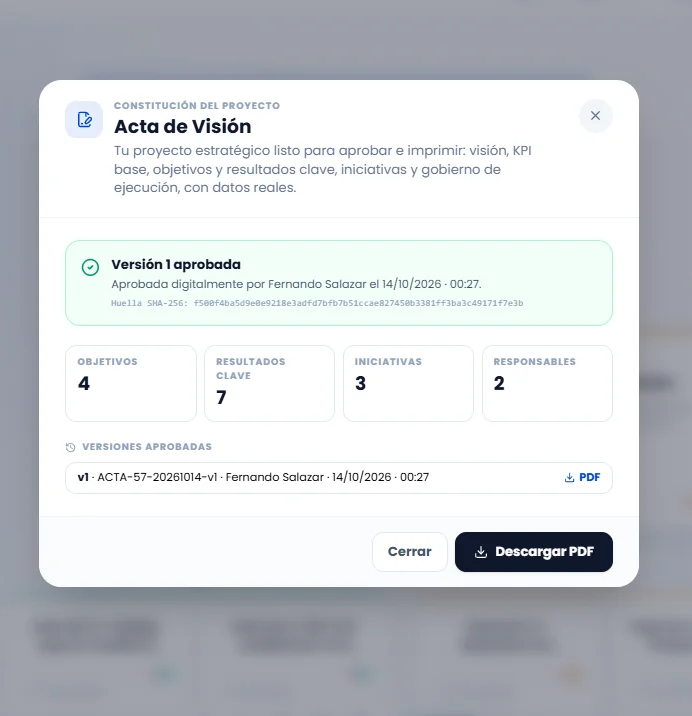
The Vision Charter formalizes the vision, objectives, key results, initiatives and execution governance in a document you can download as a PDF. Leadership approves it by confirming their identity, and the platform records who approved it, when and which version. If the strategy changes, a new version is generated and the previous ones are kept.
  • A common reference before executing.
  • Recorded approval: who, when and which version.
  • History of approved versions, each one as a PDF.

It is an internal, traceable record of the approval; it does not replace a legally valid electronic signature.

Approved Vision Charter with its version history (interface in Spanish)

03 · Strategic Map

Every effort, connected to the vision.

The problem it solves
Teams work hard, but they cannot see how their work moves the result. Initiatives multiply on their own and nobody can say which ones really matter.
How it solves it
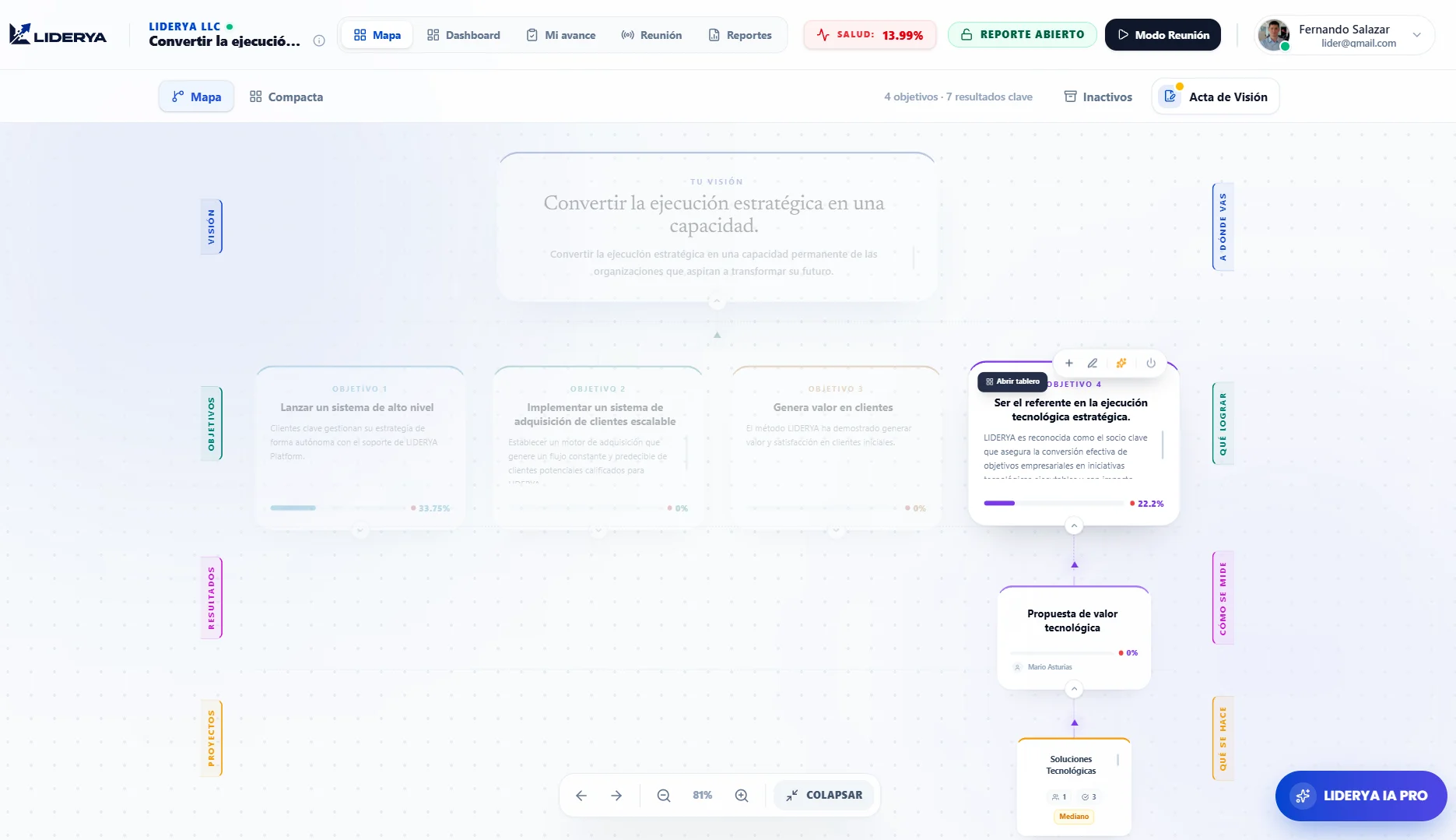
The Strategic Map shows the full chain: vision, objectives, key results, initiatives and commitments. In a technology project it reads in the team's language: milestones, acceptance criteria and deliverables. Anything that hangs from nothing becomes obvious.
  • One single view of the project, for everyone.
  • Clear owners at every level.
  • Anything that does not contribute to an objective stands out.
Strategic Map with vision, objectives and key results (interface in Spanish)

04 · 360 Board

Detailed tracking of each objective, its indicators, progress and blockers.

The problem it solves
When tracking lives in spreadsheets and scattered reports, nobody can say for sure how an objective is doing or what is holding it back.
How it solves it
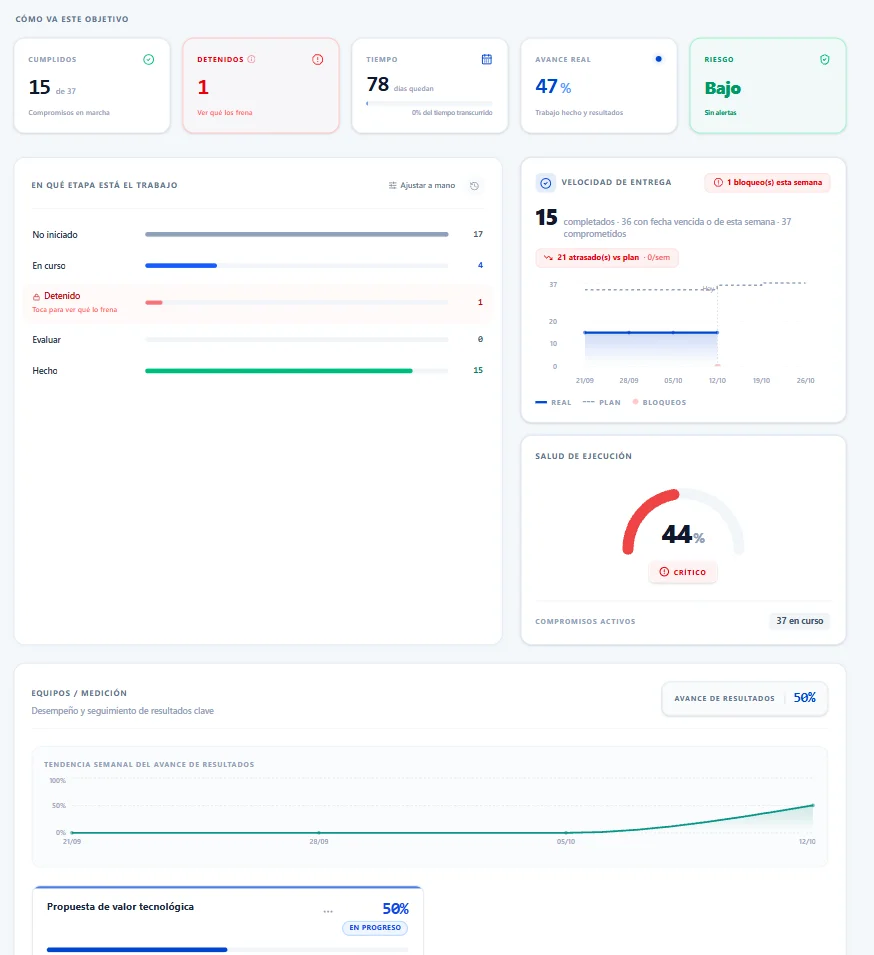
Each objective has its own board: real progress against plan week by week, the stages with their commitments and the ones that are stalled, and the status of each key result (optimal, in progress, at risk or critical). Blockers stay visible with their reason and their owner.
  • Plan versus actual, week by week.
  • Key results with a status traffic light.
  • Visible blockers with reason and owner.
360 Board of an objective with real progress, key results and blockers (interface in Spanish)

05 · CEO Dashboard

The whole organization in one executive reading.

The problem it solves
Leadership learns about deviations when it is already too late: at quarter close, in a presentation prepared to look good.
How it solves it
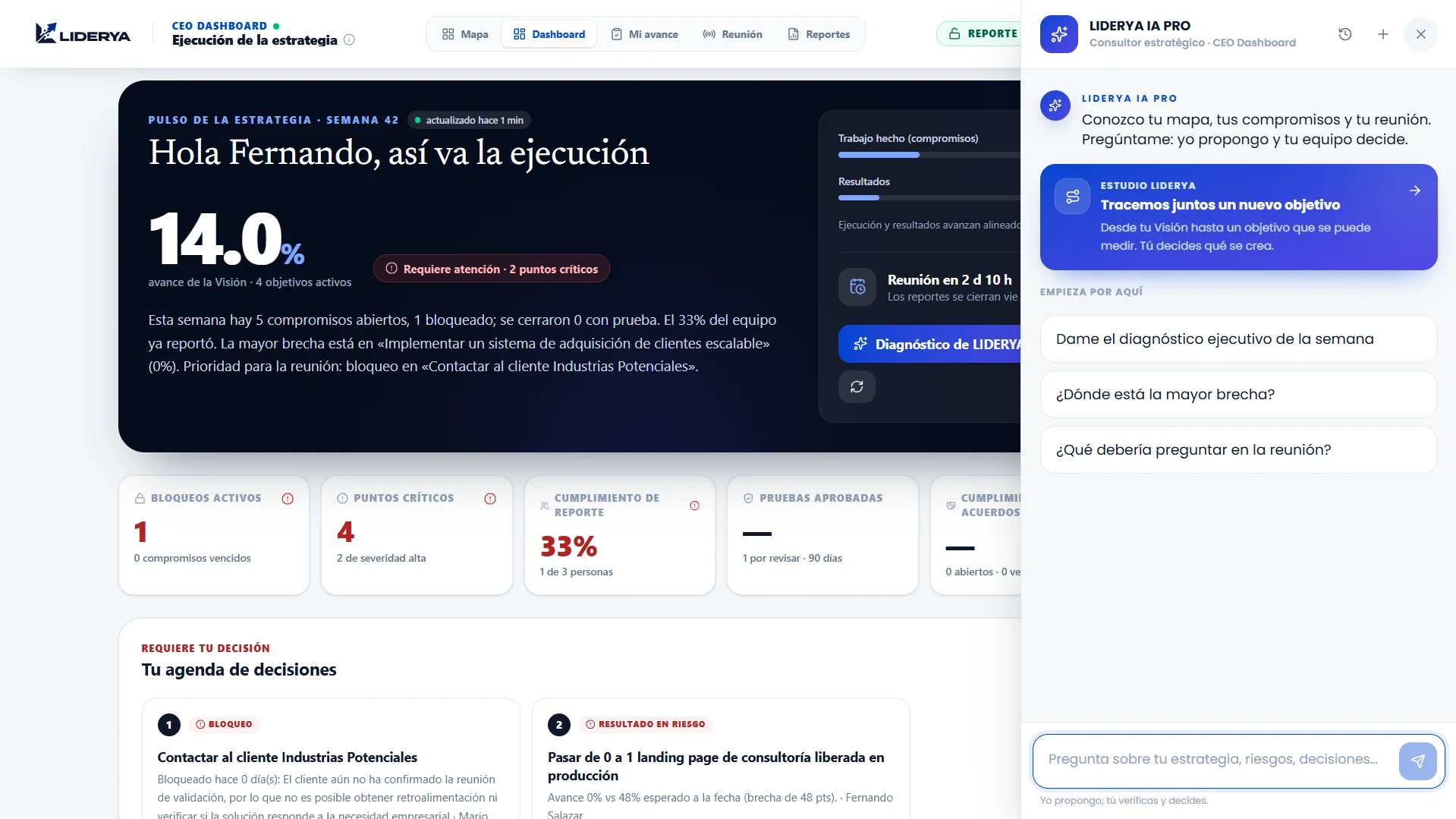
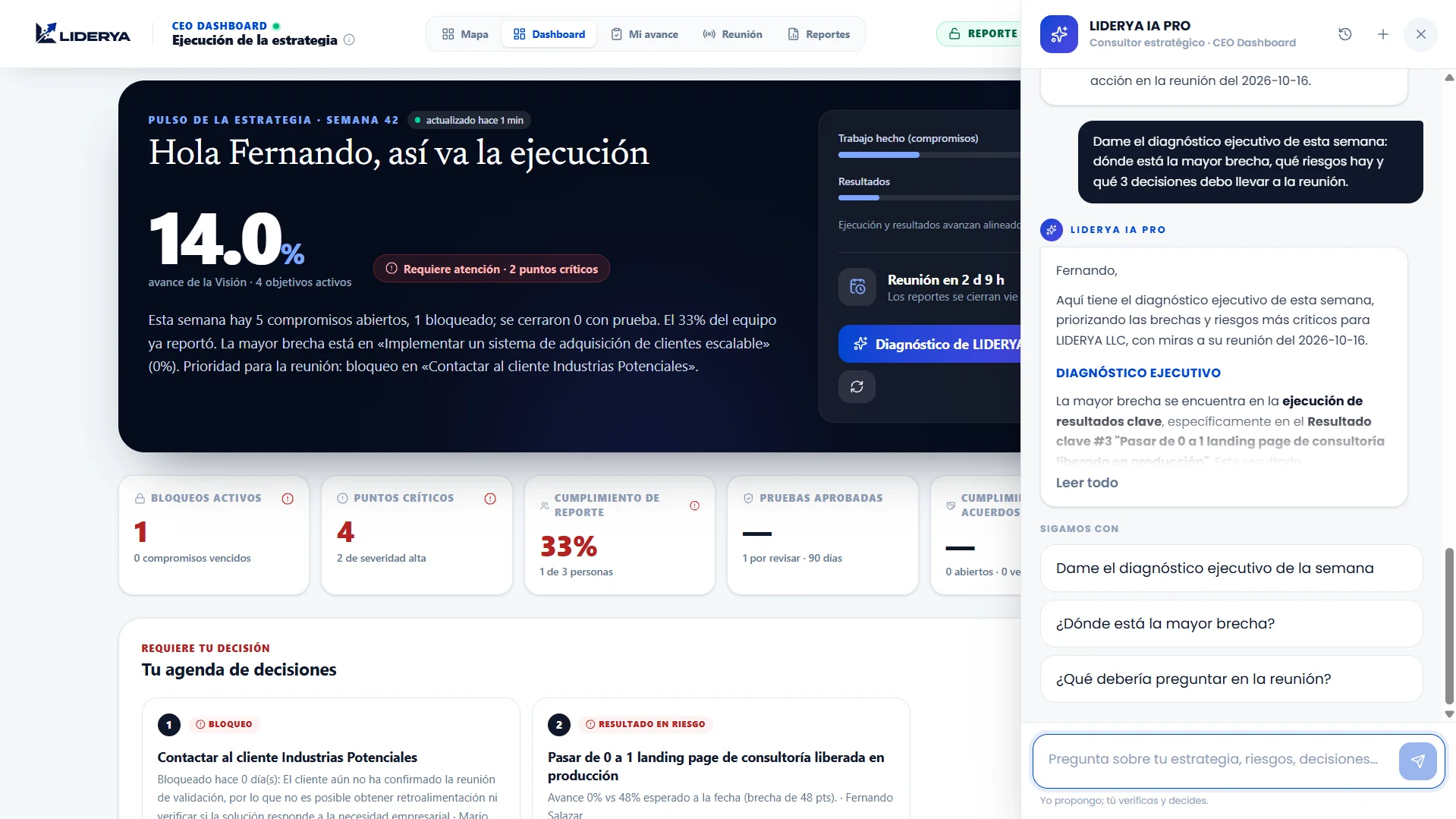
The CEO Dashboard brings every objective together on one screen: active and overdue blockers, critical points, compliance with reports and agreements, proof awaiting review and the key results with the widest gap between expected progress to date and actual progress. It opens with a decision agenda for leadership.
  • Expected versus actual progress, by key result.
  • Blockers, critical points and open agreements.
  • A decision agenda, not a to-do board.
CEO Dashboard with the decision agenda and the gap on each key result (interface in Spanish)
Leadership team reviewing their project's progress in a working session
The dashboard does not replace leadership's conversation: it prepares it with verifiable information.

06 · Reports

The executive report, ready without building it by hand.

The problem it solves
Preparing the progress report eats up hours of someone's week and, even so, it mixes opinions with facts.
How it solves it
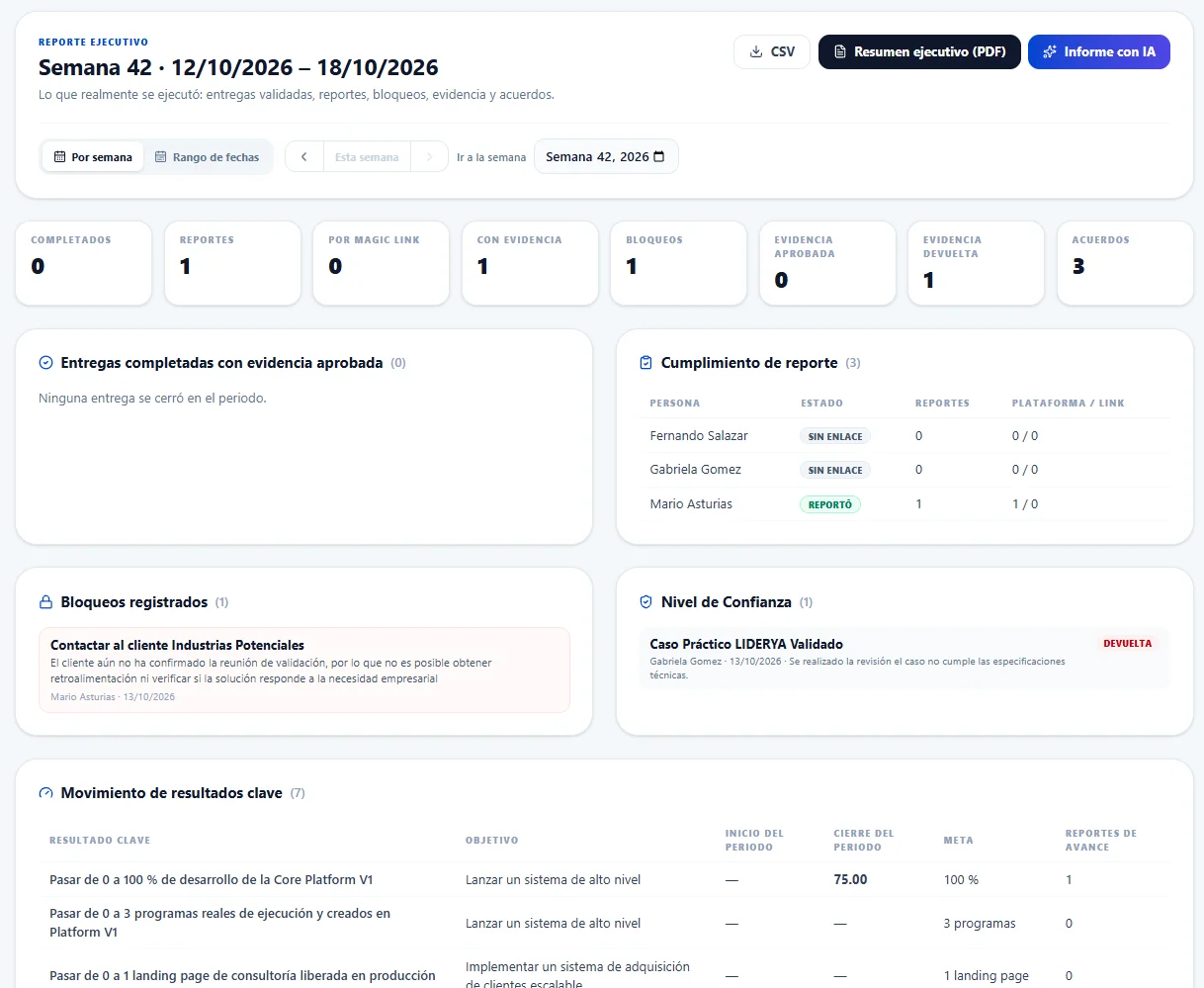
The executive report is generated from what happened in the platform: deliveries completed with approved evidence, reporting compliance, logged blockers, Confidence Level validations, movement in key results and meeting agreements. It can be viewed by week or by period (30 days, quarter, year) and exported as an executive summary in PDF or as data in CSV.
  • Deliveries counted only with approved evidence.
  • Previous weeks and periods of up to 12 months.
  • Executive summary in PDF and data in CSV.

It does not replace the 360 Board (one objective, today) or the CEO Dashboard (the whole organization, today): it tells what happened over a period.

Weekly executive report with deliveries, compliance and key result movement (interface in Spanish)

07 · Meeting Mode

A weekly meeting that always ends in commitments.

The problem it solves
The follow-up meeting turns into a round of last-minute updates. There is a lot of talk, little gets agreed and previous agreements are forgotten.
How it solves it
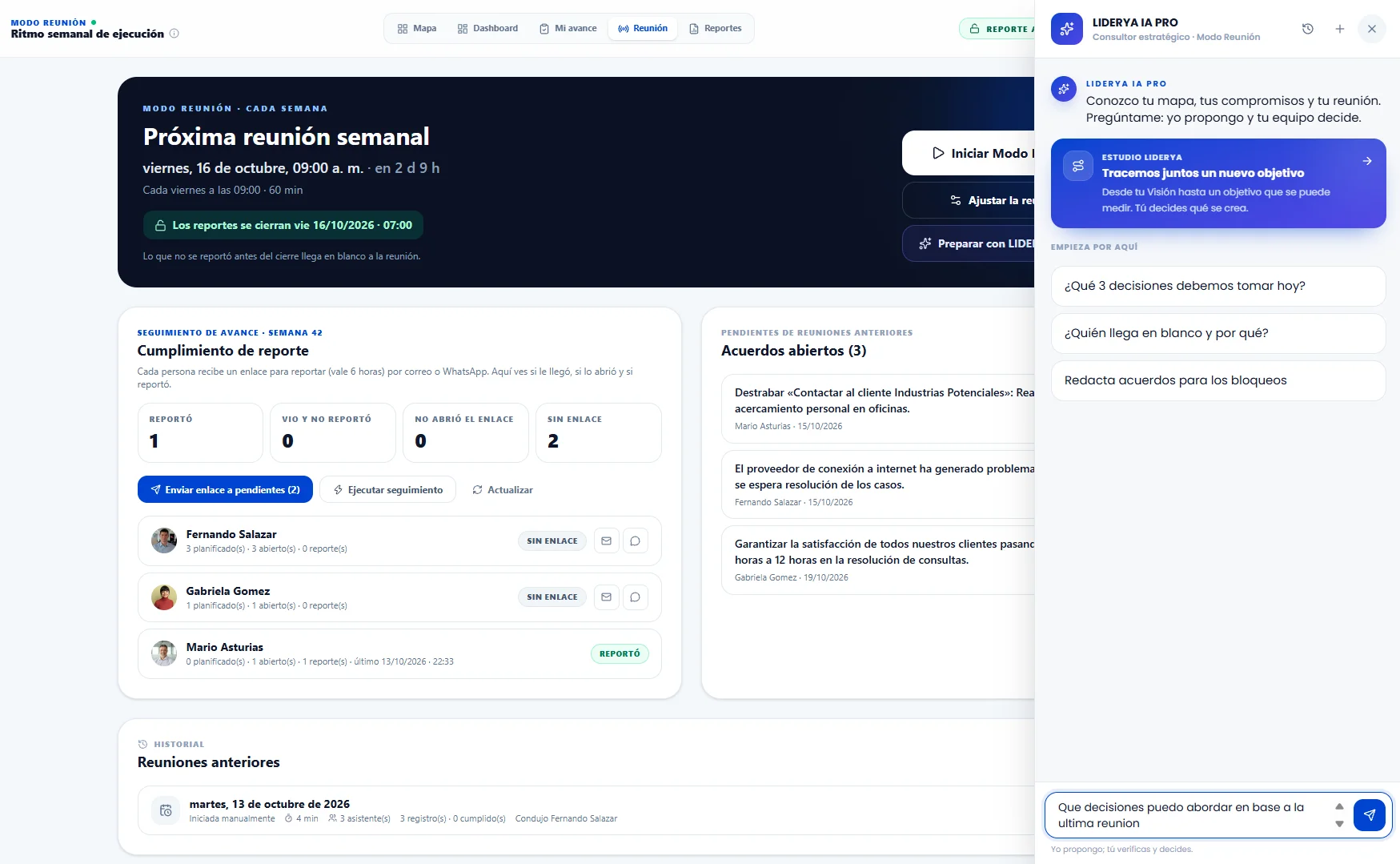
Before the weekly meeting, reports are closed: each owner arrives with their declared progress and everyone starts from the same information. The meeting first picks up the previous agreements and ends with new commitments, each with an owner and a date.
  • Reports closed before the meeting starts.
  • Previous agreements are reviewed first.
  • Every meeting leaves verifiable commitments.
Meeting Mode with last week's agreements and new commitments (interface in Spanish)

08 · Commitments agenda

What was agreed, who owns it, when it is due and what is blocking it.

The problem it solves
The meeting produces commitments, but without follow-up they fade: nobody knows which ones are due this week or which ones are stalled and why.
How it solves it
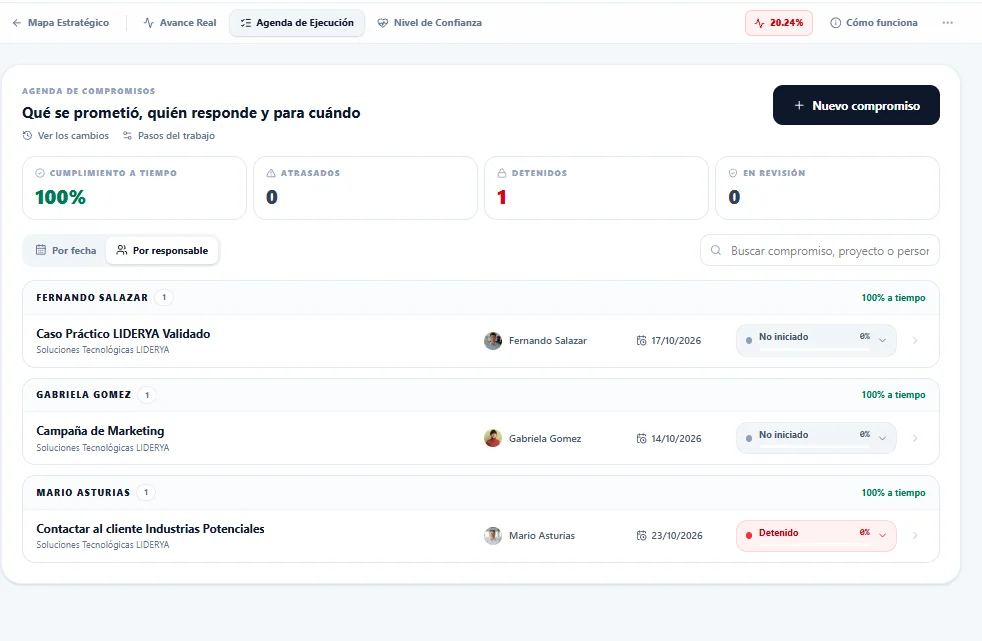
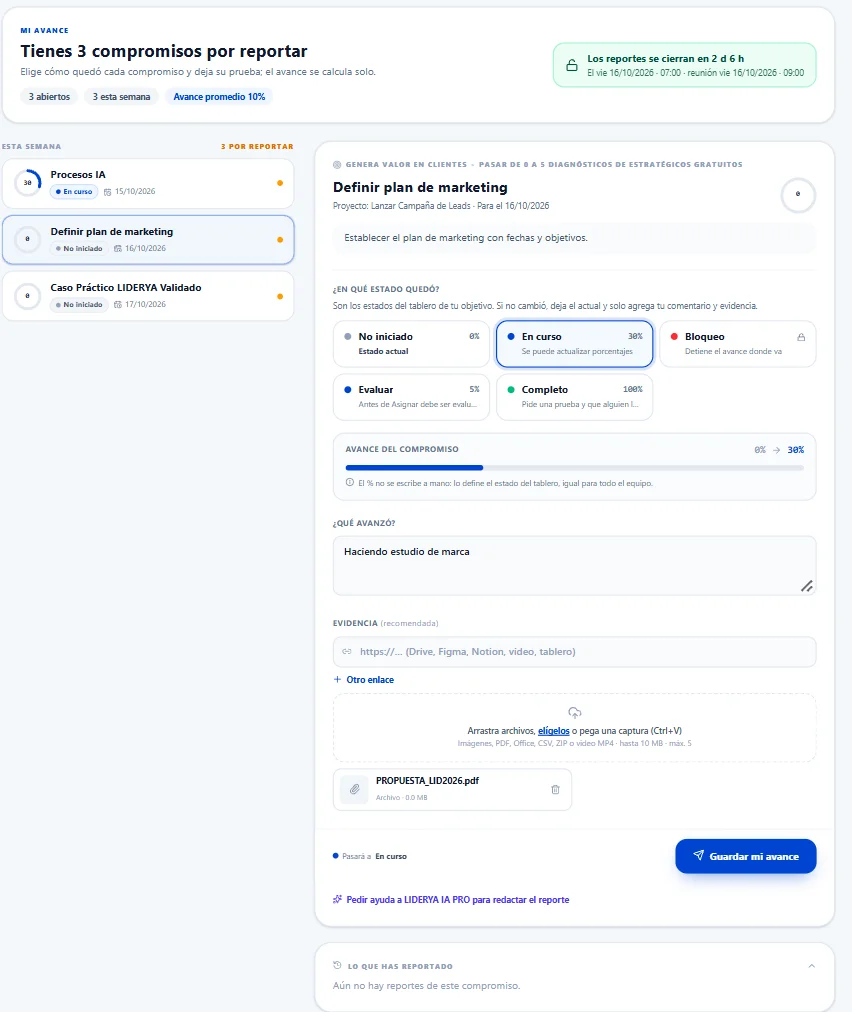
Each objective's Execution Agenda sorts commitments by due date: overdue, due this week, in review, upcoming and fulfilled with proof. Each one shows its owner, committed date, status and progress. Stalling a commitment requires logging the reason, with supporting links or files, and closing it requires proof validated by another person.
  • Grouped by due date or by owner.
  • On-time, overdue and stalled at a glance.
  • Every blocker with its reason, author and support.
Commitments agenda grouped by due date, with owners and statuses (interface in Spanish)

09 · Confidence Level

Nothing can be completed without evidence.

The problem it solves
Progress is declared, not demonstrated. A commitment shows up as finished, and weeks later it turns out it was not.
How it solves it
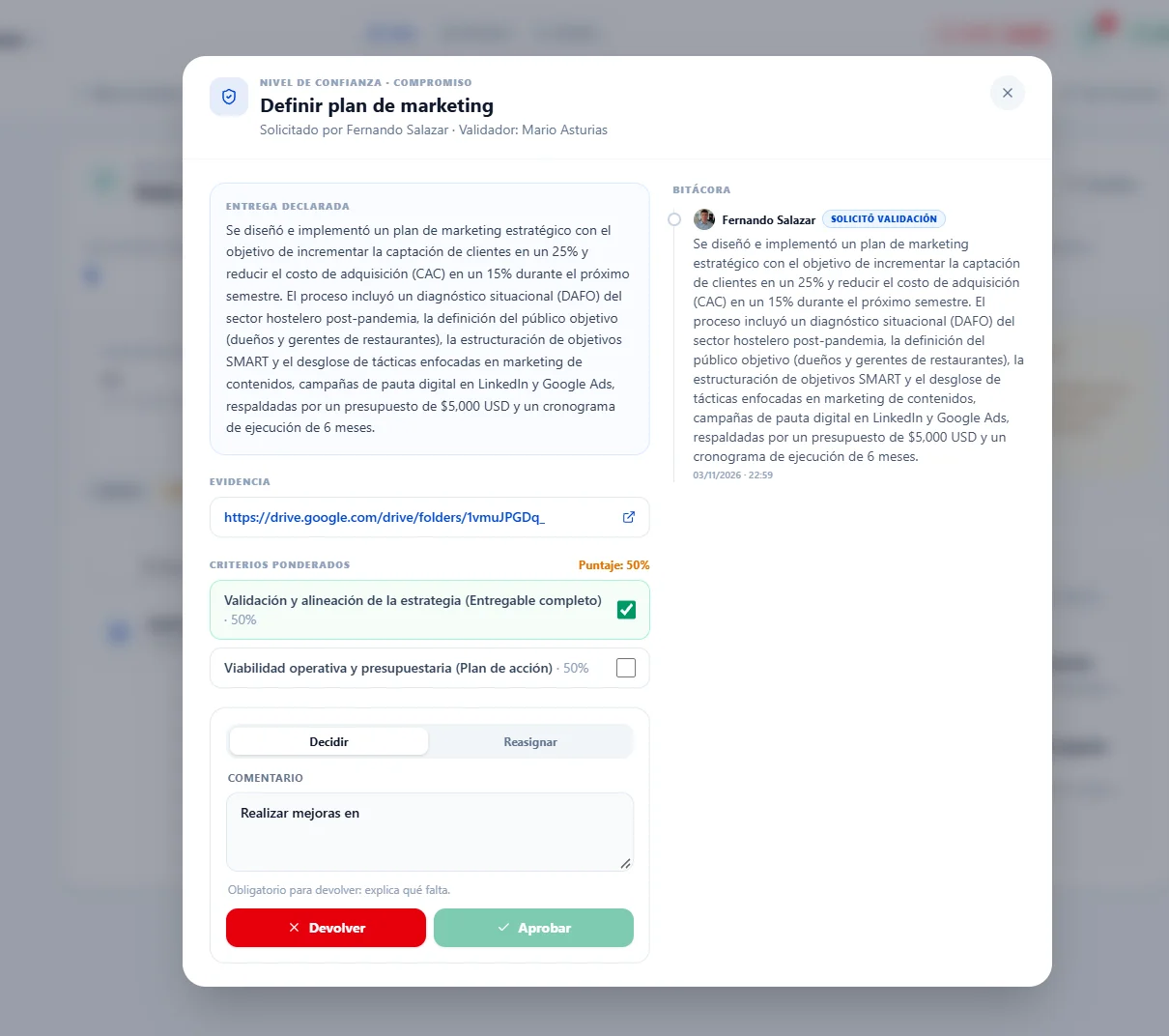
Before reaching 100%, progress is backed by evidence and validated. The Confidence Level separates what is said from what is proven, so leadership knows what it can rely on.
  • Evidence attached to every relevant update.
  • Validation before anything counts as done.
  • A record of who validated it and when.
Confidence Level with attached evidence awaiting validation (interface in Spanish)

11 · LIDERYA IA PRO

An AI reasoning engine at the service of executive analysis.

  • Quality review of every commitment.
  • Questions and options to prepare decisions.
  • AI analyzes and proposes; leadership decides.
The problem it solves
The information exists, but reading it takes time. Risk signals get lost among reports and leadership arrives at decisions without having prepared them.
How it solves it
The reasoning engine behind LIDERYA IA PRO's executive analysis runs on state-of-the-art artificial intelligence models. It audits the quality of commitments and diagnoses blockers on the 360 Board when asked; evidence is validated by a person. It interprets signals, asks questions and proposes options; it does not decide or act for anyone.
LIDERYA IA PRO assistant answering about the status of an objective (interface in Spanish)

Powered by Artificial Intelligence (AI) · AI-assisted analysis. Decisions under human control.

Complementary capabilities

  • How does it adapt to our process?

    Execution workflow configuration

    Leaders define the steps a commitment moves through: their name, how much each one counts toward progress and which ones mean “stalled”, to reflect the organization's real process. Steps can be reordered without losing commitments, and every change goes into a log that can be undone.

Why the connection matters

People deliver results when they understand how their work contributes to the vision.

That is why the platform starts with the why and ends with this week's commitment. A public reference on how purpose drives action.

Third-party reference video; not a LIDERYA production.

Is execution your main gap?

If direction is still unclear, the platform will only organize the confusion. Assess your project in 10 minutes before you decide.

How it reaches your organization

The platform is deployed with the ICEBERG Program, in 12 weeks, and stays running when the intervention ends.

LIDERYA Platform

Let's see what your project would look like, week by week.

Tell us how your team tracks progress today and which pieces of the Control Center would solve it.